How to Manage Soliciting and Requests On Events.org

Organizing events can be a daunting task, especially when it comes to managing soliciting and requests. How do you handle the influx of inquiries and ensure a smooth and organized process? Events.org has got you covered with its comprehensive platform designed to streamline and simplify event management.
Soliciting and requests are integral to event planning, but they can quickly become overwhelming if not managed efficiently. With Events.org, event organizers can now easily navigate the complexities of handling these tasks, ensuring a seamless experience for organizers and attendees.
Managing soliciting and requests is crucial for the success of any event. Events.org provides a range of features and tools that make this process more manageable, allowing organizers to focus on creating unforgettable experiences for their attendees. In this article, we will explore how Events.org can help you effectively manage soliciting and requests, making your event planning journey a breeze.
1. Utilize the Event Management Software
Events.org offers various features and tools to help you effectively manage soliciting and requests. Take advantage of features such as exhibitor/sponsor profiles, messaging systems, and event forums. Encourage attendees and exhibitors to use these features for communication and networking purposes, reducing the need for unsolicited requests.
2. Assign a Team to Handle Requests
Have a dedicated team or individual responsible for handling soliciting and requests. This team should be easily accessible and responsive to inquiries. They can filter and review requests, ensuring only relevant and appropriate ones reach attendees and exhibitors.
3. Follow our Gift Guide
The Events.org gift guide is valuable for event planners, providing a step-by-step walkthrough of the solicitation request process. With this guide, event planners can easily navigate through the entire process, from inputting the request to managing the received items.
The guide begins by explaining how to create a solicitation request, ensuring that all necessary details are included to communicate the event's needs effectively. Event planners can input the request into the system, specifying the desired items and quantities, and send it to solicitors in their contacts.
The guide also highlights the importance of providing clear instructions and any specific preferences or requirements. Once the requests are submitted, event planners can efficiently manage them by tracking the status of each request and reviewing the received items.
This allows for seamless organization and coordination of gifts, ensuring that event planners have complete control over the solicitation process. Overall, the Events.org gift guide simplifies and streamlines the entire process, empowering event planners to successfully execute their events with ease.
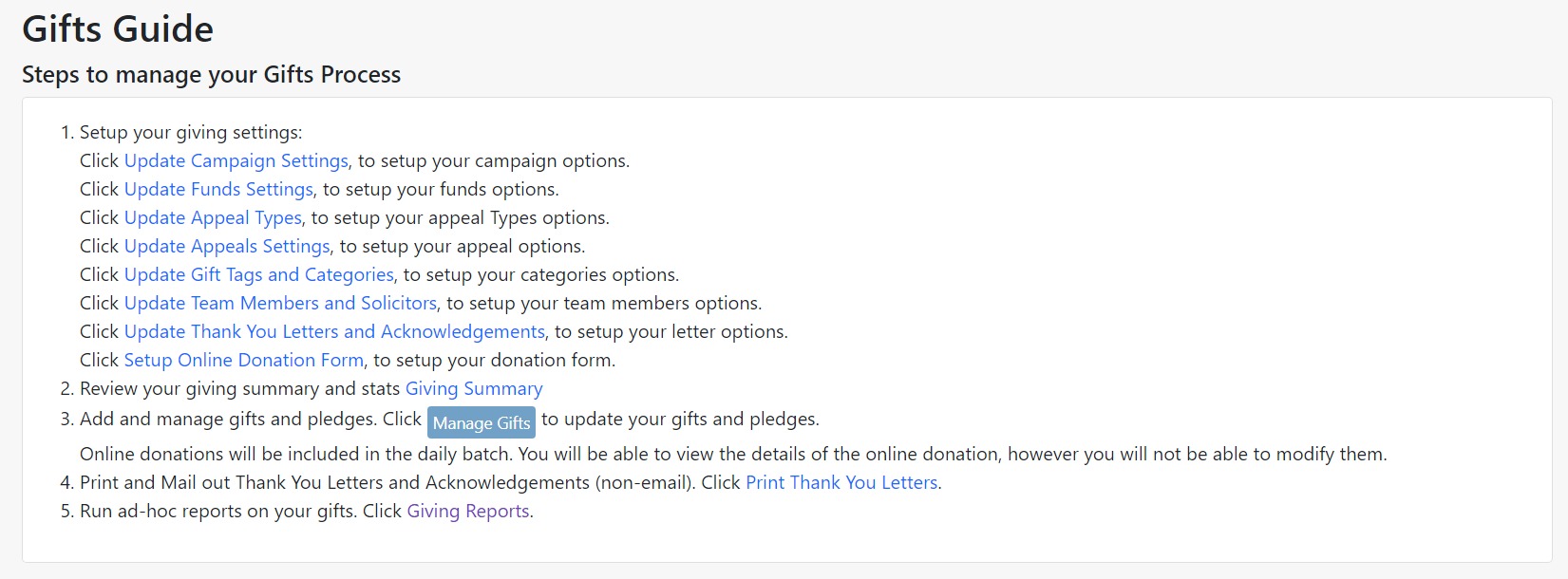
Below walks you through what each step of the Gift Guide provides for you.
Update Campaign Settings:
Under this step, you can edit, delete and add campaigns. Within each campaign, you will add a title, code, start and end date, if the campaign is active, online, your goal, and the campaign description.
For example, General Campaign would have a code of "GC" with a start date of 7/18/23 and an end date of 9/18/23. It would be currently active and held online with the goal of $10,000 and a description explaining what it is in support of.
Update Funds Settings:
Here, you can edit, delete, and add fund types. You will be prompted again to add a title, code, if the fund is active or not, the fund goal, and a fund description.
Update Appeal Types:
You can add and delete appeals under the appeal types. Simply add a title, and that is all to create a new appeal type; no other information is needed.
For example, an end-of-the-year appeal or a direct mail appeal.
Update Appeals Settings:
Here, you will edit and update any appeal types you created in the step above.
Edit the title, appeal code, appeal type, if it is active or not, the start and end dates, and goal, and you can add a description to your appeal as well.
Update Gift tags and Categories:
Within this step, you can create categories for your teams to organize donors better.
For example, you can add tags on donors who support multiple times a year or a tag for "VIP" donors close to your nonprofit.
Update Team Members and Solicitors:
Here, you can change if your member is active still or inactive, resend solicitation emails, move items to another solicitor, and delete members as well.
Update Thank You Letters and Acknowledgments:
Here, you can create multiple types of thank you letters or acknowledgments to be sent to donors automatically when they donate to your campaigns or appeals.
Thank you letters are entirely customizable and are allowed to be sent to anyone. For example, if you would like to send different thank yous to people who donated $100 and people who donated $1,000.
Setup Online Donation Forms:
Events.org has made it very easy to create donation forms. Simply click the link, which will bring you to a page to complete a new donation form.
Add the title, header message, about us section, and donation levels. Add an email if you'd like to be notified whenever there is a donation.
Customize donation button types as well as imagery, add goals, if you'd like to show donors or not, add a donor wall to display all donors or just top donors, and an area to add a thank you note on the page after the donor has donated. Below all the main customizations, you can add custom fields and questions of your choice.
Giving Summary:
Review your giving summary and stats to understand better what is working and what is not. Here you can see all information about any campaign, appeal, and all funds.
Manage Gifts:
Within this step, you will be able to see all of the donations that have been received, along with their receipt, gift type, campaign, and funds.
Print Thank You Letters:
If you decide to send out physical thank you letters rather than send them out in an email, or if you'd like to send top donors physical thank yous, you can craft them on events.org still and print them out when they are completed.
Giving Reports:
Create reports customized to your specific needs. You can save and edit reports here. As well as, for your convenience, export report results to a PDF, Excel, or CSV file.
Gift Guide Definitions
Campaigns:
A campaign is a marketing effort a nonprofit puts in place to attract donors, share their stories, and collect funding. A campaign can act as an umbrella with appeals and funds falling within a campaign, or a campaign can be completely separate from both.
Appeals:
Appeals are a way to track how your nonprofit or business is receiving gifts. For example, if you do a mailing list, that would be considered an appeal because you hope to receive donations from the mailing list you sent out to your donors.
Funds:
Funds are all the money collected for a specific cause. For example, one fund could be a Christmas fund for children to receive presents.
By following these steps and utilizing the features of Events.org, you can effectively manage soliciting and requests at your events. Remember, clear guidelines, proactive communication, and empowering attendees are essential for a successful and enjoyable event experience.
Fundraising  Your All-in-One Event Management Platform
Host Events with Ease! Events.org's comprehensive event management platform makes it easy to optimize, automate and maximize your organization's entire charitable event calendar.Events.org Benefits:
✓ Simple, Affordable Pricing for Paid Events: $1 per Transaction!
✓ FREE Events are always FREE
✓ Host & Manage Any Event
✓ Dedicated Customer Support
✓ Branded Event & Donation Pages
✓ Donor and Contacts Management (CRM)
✓ Membership Management
✓ Conference Management
✓ Volunteer Management
BONUS: Free access to the iBid's Mobile Auction AutoPilot™ - This automation tool saves you time & stress while streamlining auction tasks. Manage auction items and payment processing, including express checkout & digital receipts!